

Make a time alarm
- On Alarms, tap ⏰ Time.
- Rocco asks "once, or repeating?". Tap Just once or Repeating.
- Tap the big clock to set the time, and AM or PM to flip it.
- Pick the day:
- Just once: today, tomorrow, or You choose for a date on the calendar.
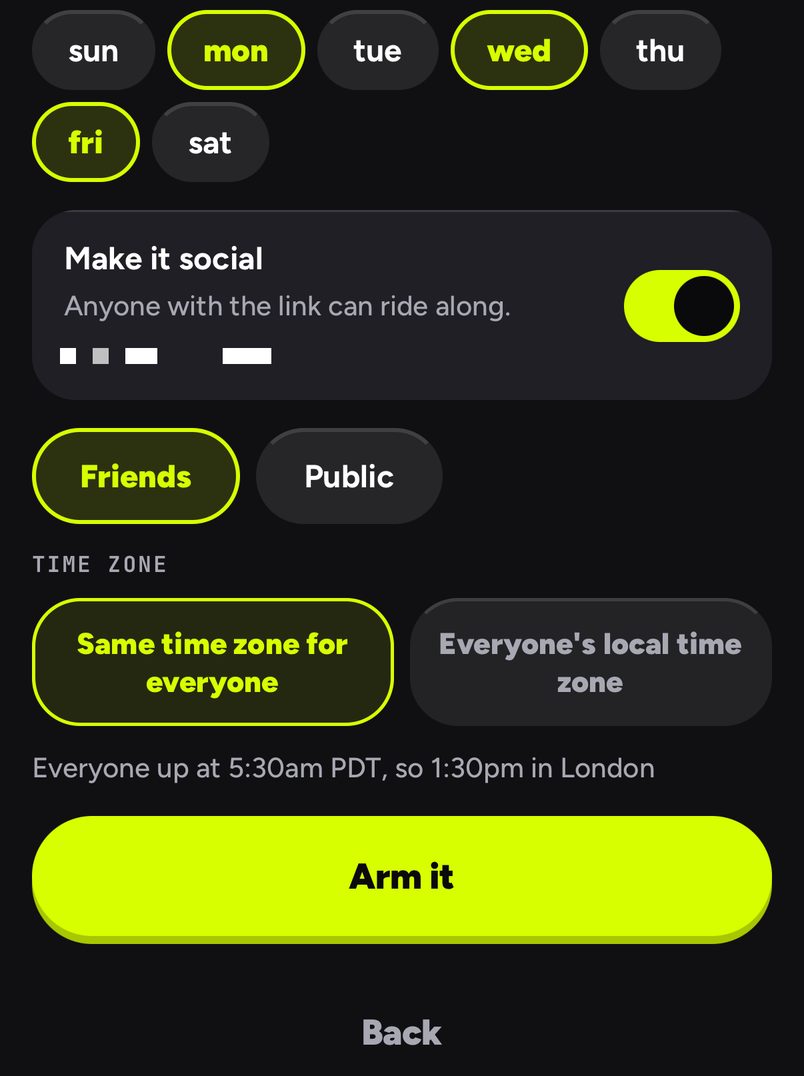
- Repeating: tap the days, sun to sat.
- Under Make it social, leave it off for a private alarm, or switch it on and pick Friends or Public.
- For a shared alarm, pick a Time zone: Same time zone for everyone (one moment for everyone, the default) or Everyone's local time zone, so each person wakes at their own 6:00am. Under it, the app spells out what that means, for example "Everyone up at 5:30am PDT, so 1:30pm in London".
- Tap Arm it, then Pick the vibe or Done.
Good to know
- A one-off alarm starts an hour from now, rounded up to five minutes. A repeating one starts at 5:30am on Monday, Wednesday and Friday. Change either.
- A time that has already passed today cannot be armed; move it to tomorrow.
- Snooze starts at 5 minutes, up to 3 times. Change it on the alarm's page under Snooze; your snooze choice applies to your own phone. See The studio.
- On iPhone, time alarms use Apple's own alarm system (AlarmKit), which rings through silent mode and Focus. On Android they take over the screen, even when the phone is locked.
- To change the time or the time zone later, open the alarm and tap Change the time. Once a second person rides it, the time is sealed. See Editing and deleting.
Same time zone for everyone, or everyone's local time zone
Same time zone for everyone is for a set moment: a flight, a call, a drop. Make it for 6:00pm in Seoul and someone in London is rung at 10:00am, in the same second. The alarm's page shows each rider both times, like "6:00pm in Seoul · 10:00am for you". It follows your zone through daylight saving.
Everyone's local time zone is for routines: a run club where everyone wakes at 6:00 wherever they are. Each phone rings at its own 6:00, and the wake board stays open for up to 24 hours, ranking people by how fast they got up after their own ring.
| Same time zone for everyone | Everyone's local time zone | |
|---|---|---|
| When a friend in another zone rings | At your moment, converted to their clock | At the same clock time on their own phone |
| Good for | A launch, a podcast, a Space, a flight | A morning routine across cities |
| Wake board | One race from the one ring | A round, open until everyone is up or 24 hours |
Three examples
- Exam morning, private. Just once, tomorrow, 6:30am, Make it social off. A Drill sergeant voice and a note to yourself: "Calculator, ID, two pens".
- A Saturday call across time zones. Just once, Saturday 7:00pm in New York, shared with friends, Same time zone for everyone. Your friend in Berlin is rung at 1:00am her time, so she knows what she signed up for before she joins.
- Gym club. Repeating, mon, wed, fri at 6:00am, shared with your gym group, Everyone's local time zone. Ana in Lisbon and Ben in Toronto each wake at their own 6:00, and the board compares how fast they got up.
Have your AI agent make it.
Paste this into ChatGPT, Claude, Grok or any AI agent that can add a connector, not into the LFG Alarm app. The setup steps come with it: get the LFG Alarm app, connect it to your agent once, and your agent makes the alarm in your account.
Use LFG Alarm to set a repeating alarm for 6:00 on Monday, Wednesday and Friday called Run club, make it a friends alarm that rings each friend at 6:00 in their own time zone, and give me the link.
Already have the LFG Alarm app and connected it to your AI agent?
Why it works. It names the days and wakes everyone at 6:00 wherever they are, which suits a routine across time zones.
