

Make an event alarm
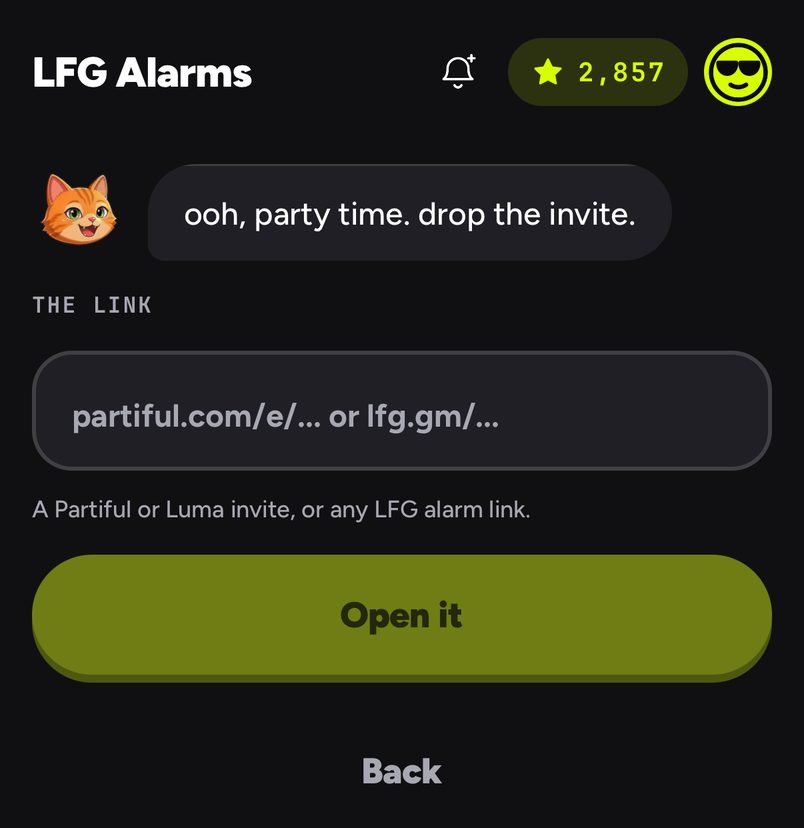
- On Alarms, tap Got a link?.
- Paste the invite into The link and tap Open it. Rocco reads the page.
- Check the card: the event's picture and name, its start time, and where it came from (Luma or Partiful).
- Under Goes off, pick At start, 30 min, 1 hr or 2 hr. One hour before is picked for you when there is still time for it.
- Choose who it is for under Make it social, then tap Create alarm. The alarm's page opens with its link ready to share.
An example
Nadia is hosting a rooftop birthday on Partiful, starting 8:00pm Saturday. She pastes the invite, picks 1 hr, turns on Make it social with Friends, and drops the alarm's link in the Partiful comments. At 7:00pm every guest who rode it is rung with the party's own picture on the screen. Her creator's note says "Buzz 4B, bring a jacket", and the call to action link opens the Partiful page with the address.
Good to know
- Only what the event page says is used. If it has no time, Rocco asks you when it should ring.
- A past event cannot become an alarm, and a time that has already passed cannot be picked.
- If you already have an alarm for the same event, Rocco offers to open it or make another.
- Guests can paste the same link and make their own alarm, too.
- Pasting an LFG Alarm link here opens that alarm.
- Event alarms ring from the phone like time alarms: on iPhone through silent mode and Focus, on Android full screen, even when the phone is locked.
LFG Alarm is not affiliated with Luma or Partiful. See How LFG Alarm adds to Partiful and to Luma.
