

Before you start
- Get the LFG Alarm app on your phone from Google Play or the App Store, and sign in. Your AI agent makes the alarms; the app is what rings them.
- Have your LFG Alarm sign-in handy. You will sign in once, on lfg.gm, to let ChatGPT use your account.
Connect it
- On chatgpt.com in a browser (adding one is web only), open Plugins.
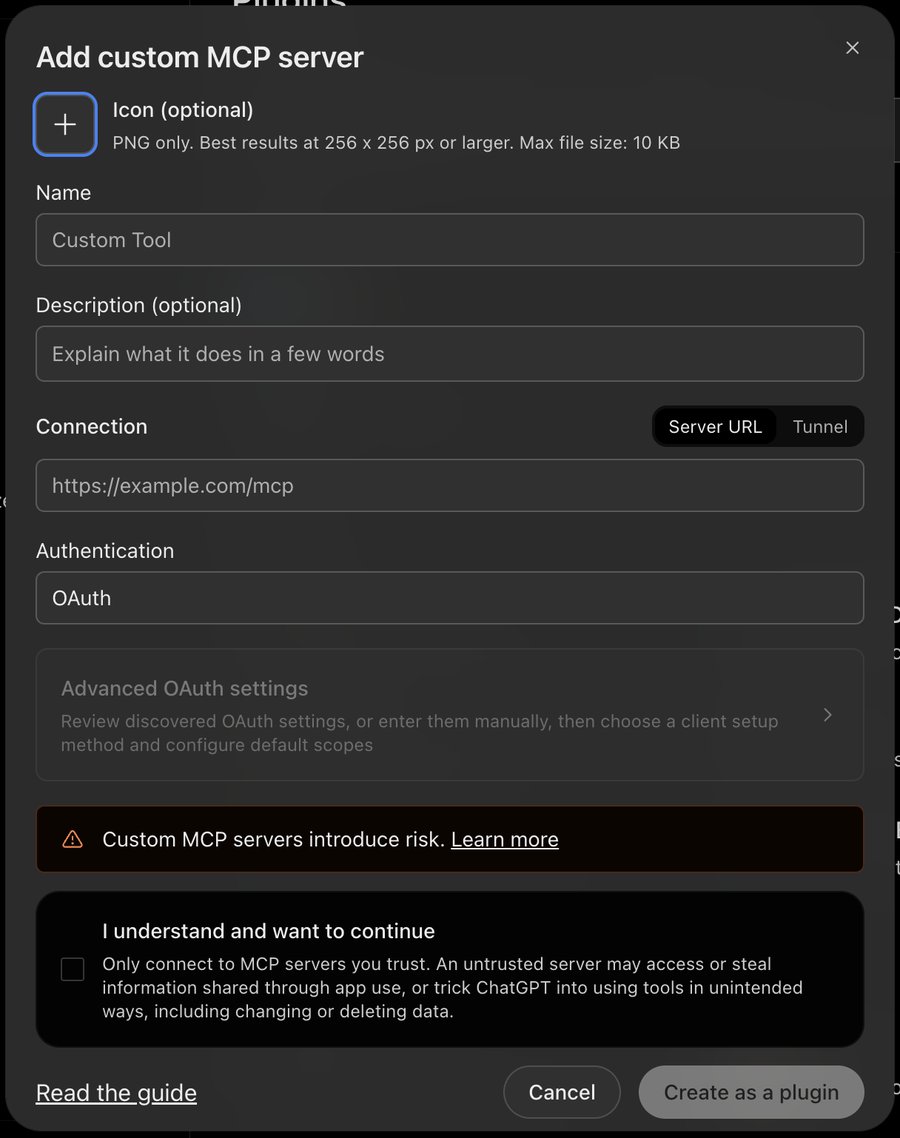
- Click +, then Add custom MCP server.
- Fill in Name:
LFG Alarm. The icon and description are optional. - Under Connection, keep Server URL selected and paste
https://mcp.lfg.gm. Leave Authentication on OAuth; you do not need Advanced OAuth settings. - Tick I understand and want to continue, click Create as a plugin, then install it.
- A window opens on lfg.gm: sign in with your LFG Alarm account and tap Allow.
These steps follow ChatGPT's own help pages as of October 2026. Menus move; if a label is different, look for where ChatGPT lets you add a custom MCP server or connector.
Codex
Codex (the CLI, the IDE extension and the ChatGPT desktop app's Codex) shares one config. In a terminal:
codex mcp add lfg-alarm --url https://mcp.lfg.gm
codex mcp login lfg-alarm
The second command opens lfg.gm to sign in.
Use it in a chat
In a chat, type @ and pick LFG Alarm, or choose it from the + menu. Then ask. ChatGPT asks you to confirm before it makes or changes anything.
The natural place is the end of a plan you already made with ChatGPT: a revision timetable, a packing list for an early flight, a group dinner. Ask it to turn the times into alarms, and to add the friends who are in on it by their LFG Alarm usernames.
Try it
Once it is connected, ask in plain words:
Have your AI agent make it.
Paste this into ChatGPT, Claude, Grok or any AI agent that can add a connector, not into the LFG Alarm app. The setup steps come with it: get the LFG Alarm app, connect it to your agent once, and your agent makes the alarm in your account.
Use LFG Alarm to set alarms for my exam week: 6:30 on Monday to Friday called "Revise", and a one-off for 7:00 on the exam day, this Thursday, called "Exam". Then tell me when each one goes off.
Already have the LFG Alarm app and connected it to your AI agent?
Why it works. Two alarms in one request, one repeating and one one-off, and ChatGPT tells you when each goes off, so you can check both.
More ideas: "Wake me at 7:00 every weekday and call it Get up", "Make a friends alarm for Saturday at 9am called Golf and add my friends [username] and [username]", or "List my alarms". Today your AI agent can set time alarms, price alarms (a target price or a percent move), post alarms (an X account posting what you describe, or a Twitch or YouTube channel going live), event alarms from a Luma or Partiful link, and anything alarms (a private link any system can ring); list, change and delete them; add your friends or a whole group; pick a sound or look from the library; and add your own picture, song or voice. Each alarm it makes comes back with its link, a share picture with a QR code and a message ready to send. Wallet and trader alarms are made in the app for now. See Using LFG Alarm from your AI agent for everything it can do.
If it does not work
- No Plugins, or no Add custom MCP server. OpenAI documents custom MCP servers for Business, Enterprise and Edu, where an admin must allow Create plugins with MCPs. Other plans may differ or may not have it yet. Older versions had it under Settings > Apps with Developer mode turned on.
- It can read but not make alarms. Some ChatGPT plans only allow read actions from custom servers. Listing alarms will work there, setting them will not.
- It stops working after a while. Remove the plugin and add it again to sign in fresh.
- Still stuck? Remove the connector and add it again, or write to us from the support page.
Disconnect
Remove the LFG Alarm connector in ChatGPT's settings. Your alarms stay in your LFG Alarm account and keep ringing.
Learn more
- What is LFG Alarm? and your first alarm
- Time alarms, Friends and groups and Sharing and reach
- The fastest way to make a group alarm
- Connect LFG Alarm to another AI app
Sources and further reading
- OpenAI Help: Custom MCP servers in ChatGPT
- OpenAI Help: Developer mode and apps
- OpenAI docs: Connect to ChatGPT
LFG Alarm is not affiliated with ChatGPT.
