

Before you start
- Get the LFG Alarm app on your phone from Google Play or the App Store, and sign in. monday triggers the alarm; your phone does the ringing.
- An LFG Alarm plan that includes Anything alarms. See the plans on lfg.gm.
- Permission to add apps to your monday account. On some accounts only an admin can.
Make the alarm
- In LFG Alarm, on Alarms, tap 🔮 Anything.
- Name it for what it means, for example "Deal stuck" or "Urgent ticket". The ring screen shows the alarm's name and nothing from monday, so pick a name that says what happened.
- Pick a Cooldown: how long it stays quiet after it rings, from 1 minute to 1 hour. That way a burst of changes rings once, not ten times.
- Share it with the people who should wake up (an Anything alarm is private or friends, never public), and tap Arm it.
- On the link card, tap Copy. The link looks like
https://api.lfg.gm/horn/followed by 32 letters and digits. Keep it private: anyone with it can ring the alarm.
Add LFG Alarm to monday
- Press Add to monday.com at the top of this page.
- Pick your monday account and approve the install.
Ring it from a board
- On the board, open Automate, then Create automation.
- Choose a trigger, for example When status changes to something, and set it to Stuck.
- For the action, search for Ring an LFG alarm. The sentence reads "ring the LFG alarm at Webhook link".
- Paste the alarm's link into Webhook link and create the automation.
It works the same in monday Workflows: add a step, search for Ring an LFG alarm, and paste the link.
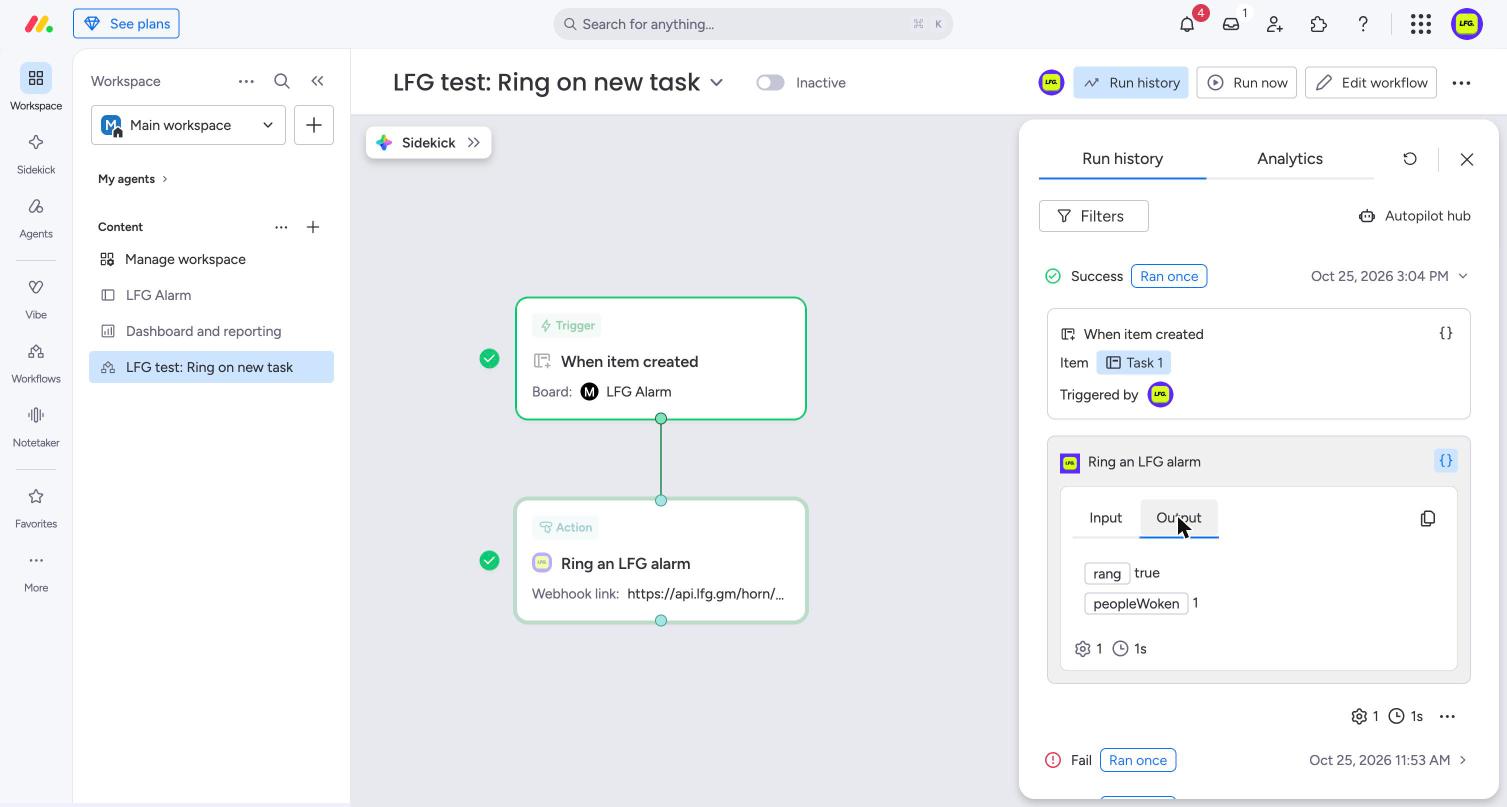
What it sends back
Each run returns two values that later steps can use:
- Rang: true when the alarm rang, and false when it had just rung and skipped this one.
- People woken: how many phones it rang.
If the link is not an LFG Alarm link, or the alarm was deleted, the step fails with a plain message and monday turns the automation off, so a wrong link never fails silently.
Ideas
- When a deal moves to Closed won, ring the sales team.
- When a ticket is marked Urgent, ring whoever is on call tonight.
- When a launch item's date arrives, ring everyone on the launch board.
If it does not work
- Ring an LFG alarm is not in the list. Check the app is installed on your account, then reload the page.
- The step fails. Copy the link again from the alarm's link card: it must start with
https://api.lfg.gm/horn/. - It ran but nobody's phone rang. The ring may have fallen inside the alarm's Cooldown (Rang shows false), or the people on it have not joined yet.
- Still stuck? Write to us from the support page.
Remove it
To stop one board from ringing, turn off or delete its automation. To remove the app, open monday's Apps marketplace from your profile picture, find LFG Alarm under your installed apps, and uninstall it; automations that use it stop. To stop the alarm itself, delete it in LFG Alarm, or tap New URL on its link card so the old link stops working.
Learn more
Sources and further reading
LFG Alarm is not affiliated with monday.com.
