

Before you start
- Get the LFG Alarm app on your phone from Google Play or the App Store, and sign in. Databricks triggers the alarm; your phone does the ringing.
- An LFG Alarm plan that includes Anything alarms. See the plans on lfg.gm.
- A workspace admin to add the notification destination.
Make the alarm
- In LFG Alarm, on Alarms, tap 🔮 Anything.
- Name it for what it means, for example "Revenue dropped" or "Nightly job failed". The ring screen shows the alarm's name and nothing from Databricks, so pick a name that says what happened.
- Pick a Cooldown: how long it stays quiet after it rings, from 1 minute to 1 hour. That way an alert that keeps firing only rings once.
- Share it with whoever is on call, and tap Arm it.
- On the link card, tap Copy. It starts with
https://api.lfg.gm/horn/. Keep it private: anyone with it can ring the alarm.
Add it as a notification destination
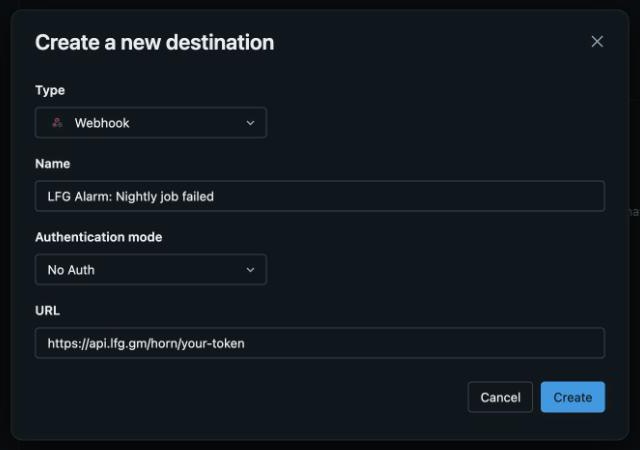
- A workspace admin opens Settings, then Notifications, then Notification destinations, and chooses Add destination.
- Type: Webhook. Name:
LFG Alarm: Revenue dropped. Authentication mode: No Auth. URL: the alarm's link. - Click Create.
Ring when a SQL alert fires
- Open the SQL alert, then Notifications.
- Add the LFG Alarm destination and save.
When the alert's condition is met, Databricks posts to the link and every phone on the alarm rings.
Ring when a job or pipeline fails
In the job's Job notifications, add the same destination under Failure. You can also add it under Success, Start or Duration warning, for example to get rung when a long backfill finally finishes.
Let your Databricks agents use LFG Alarm
Databricks can connect to outside MCP servers, and LFG Alarm has one at https://mcp.lfg.gm.
- In the workspace, open Unity Gateway, select MCPs, click + MCP and choose Connect an existing MCP server.
- Pick a catalog and schema, and name it
lfg_alarm. The name can't be changed later. - Click Create new connection, enter
https://mcp.lfg.gm, and choose OAuth. Or choose bearer auth with a personal key from the app's Settings, AI apps and keys. - Click Create & load tools, then Login to sign in to LFG Alarm once, pick the tools to expose, and click Create MCP Service.
- Test it in AI Playground: Tools, + Add tool, MCP Servers, External MCP servers, then the LFG one. Ask it to list your alarms.
This needs a Unity Catalog workspace in a region with Model Serving, and the CREATE SERVICE and CREATE CONNECTION permissions on the schema.
Let your AI set it up
Have your AI agent make it.
Paste this into ChatGPT, Claude, Grok or any AI agent that can add a connector, not into the LFG Alarm app. The setup steps come with it: get the LFG Alarm app, connect it to your agent once, and your agent makes the alarm in your account.
Use LFG Alarm to make an Anything alarm called "Nightly job failed" with 30 minutes of quiet time, add [the on-call teammate's LFG Alarm username], and give me its link. Then tell me how to add it as a Webhook notification destination in Databricks and attach it to my job's Failure notifications.
Already have the LFG Alarm app and connected it to your AI agent?
Why it works. One request makes and shares the alarm, and your AI walks you through the Databricks side. Connect LFG Alarm to your AI app first: see [AI agents](/agents).
If it does not work
- The destination test fails. Copy the link again from the alarm's link card: it must start with
https://api.lfg.gm/horn/. - The alert fired but nobody's phone rang. The ring may have fallen inside the alarm's cooldown, or the people on it have not joined yet.
- The MCP tools don't load. Check the workspace has Unity Catalog and Model Serving in its region, and that you have CREATE SERVICE and CREATE CONNECTION.
- Still stuck? Write to us from the support page.
Learn more
- The Anything alarm
- Phone alarms for founders and solo developers
- Connect LFG Alarm to your AI app
- For developers
Sources and further reading
- Databricks docs: Manage notification destinations
- Databricks docs: Databricks SQL alerts
- Databricks docs: External MCP servers
LFG Alarm is not affiliated with Databricks.
