

Before you start
- Get the LFG Alarm app on your phone from Google Play or the App Store, and sign in. Slack is where you ask; the app is what rings.
- Permission to add apps to your Slack workspace. Some workspaces only let admins add apps. If yours does, Slack offers to send your admin a request.
Add it
- Press Add to Slack at the top of this page.
- Pick your workspace in the top corner of Slack's page, check what LFG Alarm asks for, and tap Allow.
- The first time you ask Rocco for something, he asks you to Connect LFG Alarm. A page opens on lfg.gm: sign in with your LFG Alarm account and tap Allow. Each person in the workspace connects their own account, once.
Ask Rocco for an alarm
There are three ways to ask, and they all work the same:
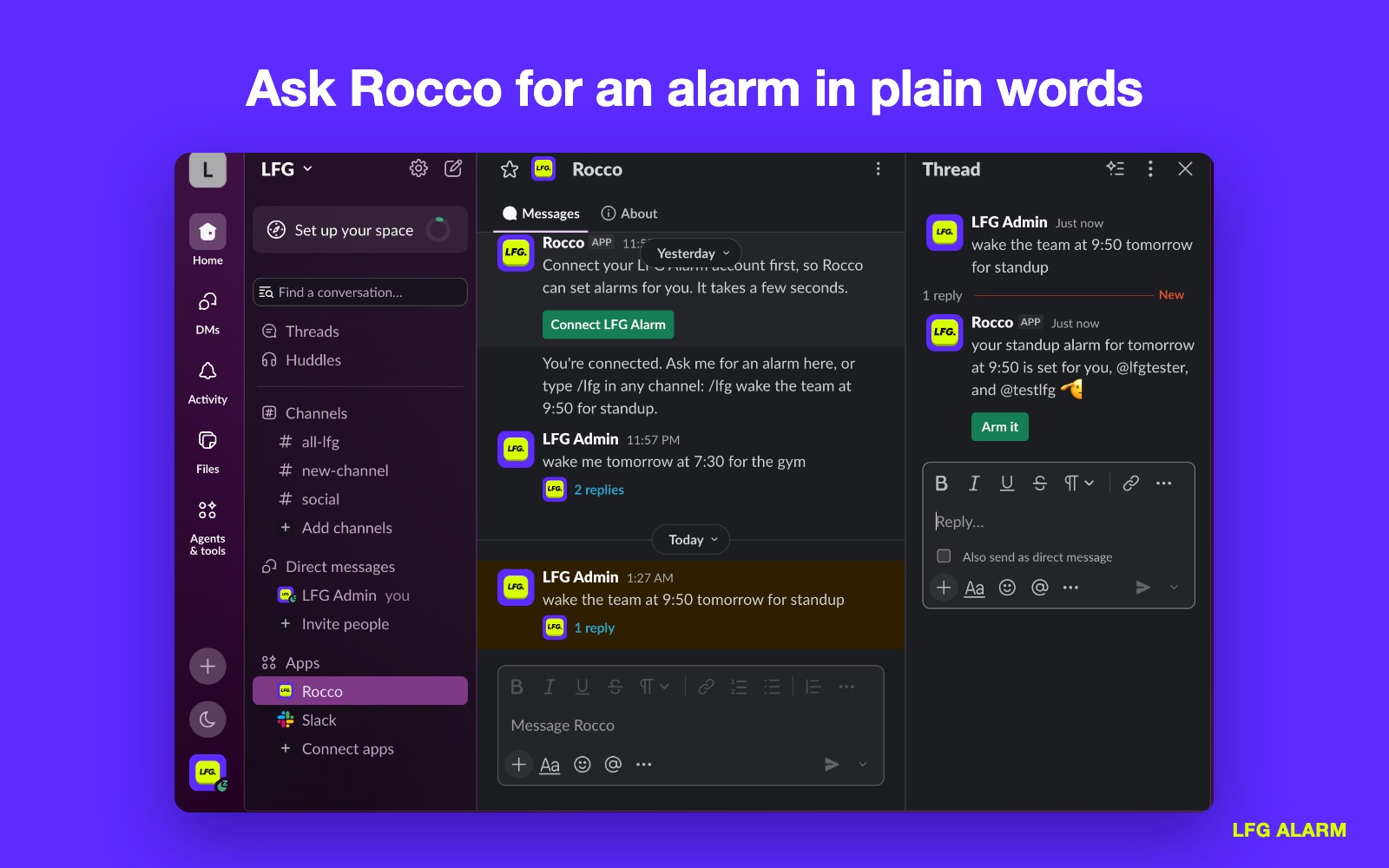
/lfgin any channel, followed by what you want. Only you see Rocco's answer until you arm it.- A direct message to Rocco, from Apps in Slack's sidebar.
- An @mention, like
@Rocco ring us when the Lakers game starts.
Rocco answers in plain words. If he needs to know something, such as which day you mean, his question comes with buttons for the answers. When the alarm is right, tap Arm it.
The whole channel can join
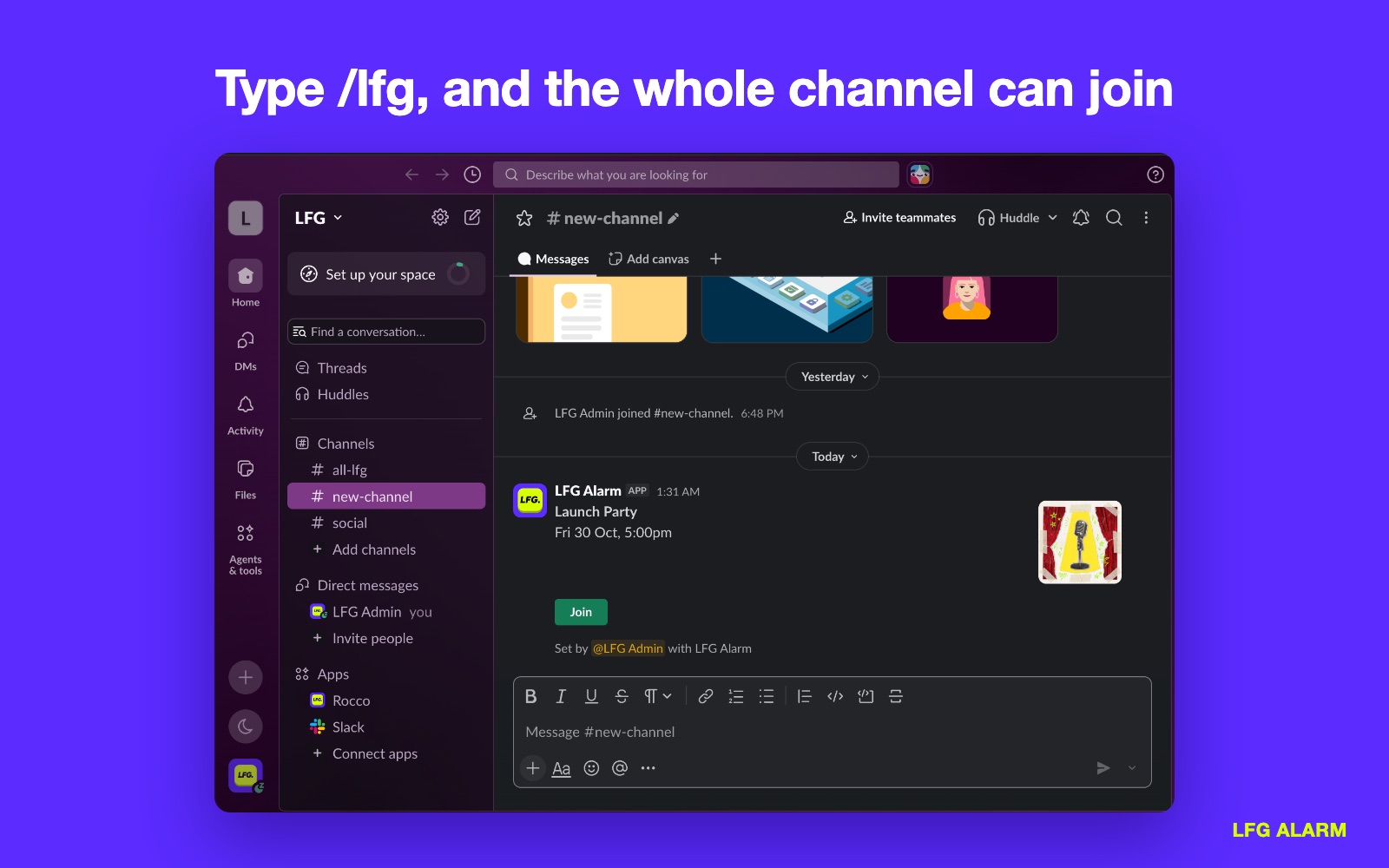
When you arm an alarm, Rocco posts its card where you asked: the name, when it goes off, its picture and a Join button. Anyone who taps Join gets it on their phone, and it rings for all of them at once.
Paste any lfg.gm alarm link into Slack and it opens into the same card. A public alarm shows what it is waiting for; a friends alarm shows only that it is one; a surprise alarm stays wrapped until it rings.
Try it
Have your AI agent make it.
Paste this into ChatGPT, Claude, Grok or any AI agent that can add a connector, not into the LFG Alarm app. The setup steps come with it: get the LFG Alarm app, connect it to your agent once, and your agent makes the alarm in your account.
/lfg wake the team at 9:50 every weekday for standup
Already have the LFG Alarm app and connected it to your AI agent?
Why it works. One plain sentence sets a repeating time alarm, and the card it posts lets the whole channel join.
More ideas: /lfg ring us 10 minutes before the launch on Friday at 5pm, /lfg ring me when Elon Musk posts about Starship, or /lfg ring the team when the Lakers game starts. Rocco can set time alarms, alarms for when an account posts or a channel goes live, price alarms, alarms for a Luma or Partiful event, and 🔮 Anything alarms that any system can ring.
Alerts into a channel, without the app
An alarm Rocco watches can also send each alert it finds to a Slack channel. Make an Incoming Webhook for the channel at api.slack.com/apps, copy its URL, and paste it under the alarm's Send alerts to in LFG Alarm. Each alert posts as a message.
If it does not work
- Rocco keeps asking you to connect. Tap Connect LFG Alarm and finish signing in on lfg.gm. If you removed Slack under AI apps and keys in LFG Alarm's settings, you connect again the same way.
/lfgdoes nothing in a channel. Check the app is installed in this workspace, under Apps in the sidebar.- Arm it says the alarm is already set. It was armed once already. Ask again with
/lfgfor a new one. - Still stuck? Write to us from the support page.
Remove it
To disconnect your own account, open LFG Alarm's settings, then AI apps and keys, and remove Slack. To take the app out of the workspace, open it from Apps in Slack's sidebar and remove it there, or ask your Slack admin. Alarms you made stay in your LFG Alarm account and keep ringing.
Learn more
- What is LFG Alarm? and your first alarm
- Friends and groups and Sharing and reach
- How to make Zapier ring your phone
- Connect LFG Alarm to an AI app
Sources and further reading
- Slack Help: Add apps to your Slack workspace
- Slack Help: Manage app approval for your workspace
- Slack docs: Sending messages using incoming webhooks
LFG Alarm is not affiliated with Slack.
