

Why "with their OK" is the whole point
Phones are built so that nobody else can put things on yours. That is a good rule, and it is also why "set an alarm on my partner's phone" usually means texting them to set it themselves, then hoping they did.
Trusted friends is the narrow exception, made on purpose by both people:
- Both of you agree, in person or on a call. One of you reads a six-digit code to the other, who types it on their own phone.
- Both phones ask for their own unlock. Face ID, a fingerprint or the passcode, so it is really the two of you.
- It is mutual. You can set alarms for them, and they can set alarms for you.
- It is small. Three trusted friends each, and up to 2 alarms a day from each of them. A third that day asks first, like any friend's.
- It is easy to undo. Either of you taps Turn off, once, and it ends. You stay friends.
Nobody, no app and no AI can make someone your trusted friend for you. That is what makes it safe to say yes to.
How to add a trusted friend
You both need the LFG Alarm app, and you need to be friends in it first.
- Open Settings (your picture, top right), then Friends.
- Under the search, tap Add a trusted friend.
- Tap Pick a friend, choose them, then Get the code. Your phone asks for its unlock.
- Read them the six-digit code. It works for 2 minutes.
- On their phone, they tap the notification "@you wants to be trusted friends" (or Respond in their Friends), type the code, tap Confirm and unlock their phone.
That's it. Both phones say you are trusted.
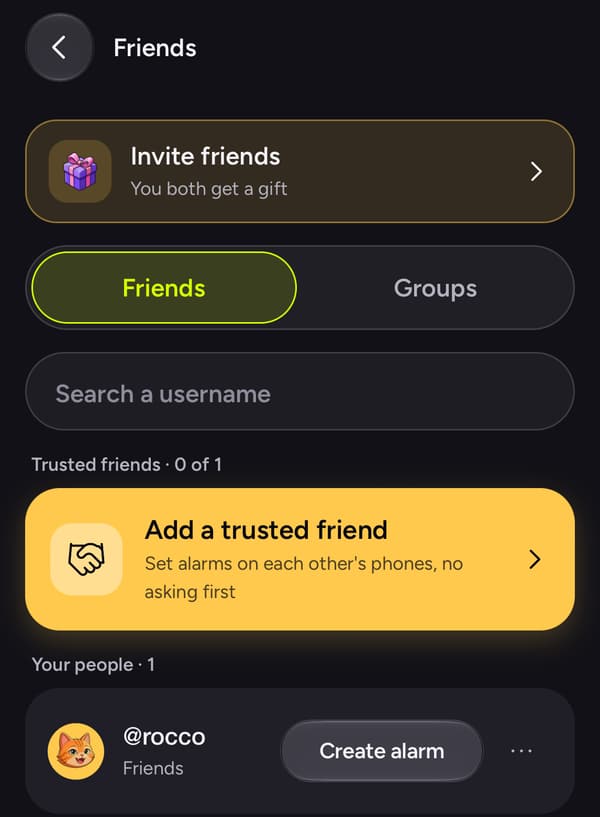
The trusted friends page in the wiki has every screen and what each button does.
How to set the alarm on their phone
Make an alarm with them on it, the same as with any friend:
- In Settings > Friends, tap Create alarm on their row.
- Pick the kind of alarm. Most of these are ⏰ Time: pick the day and the time.
- Write what it is for in the alarm's words or the keeper's note. Add a picture or a song if you like.
- Save it.
It is on their phone straight away, and they get a notification that says you set it. When the time comes, their phone rings like an alarm, not a buzz: on iPhone through Apple's own alarm system, which rings through silent mode and Focus; on Android full screen, even locked.
What people use it for
The best uses are the small ones where "did you set it?" is the whole problem:
| Who | The alarm | When it rings |
|---|---|---|
| Your partner | "Pick me up, arrivals, door 4" | 20 minutes before your flight lands |
| Your partner | "Leave now, dinner with my parents is at 7" | 6:15pm |
| A parent, for their teen | "Practice moved to 4. Leave at 3:40" | 3:40pm |
| A grown kid, for a parent | "Call the pharmacy before 5" | 4:00pm |
| A best friend | "Concert tickets go on sale" | 9:55am on sale day |
| A roommate | "Bins out tonight" | 8:00pm |
Two more guides go deeper: don't forget to pick me up, for partners, and setting alarms for a family member.
Ask your AI agent to set it
Once you are trusted friends, an AI assistant such as Claude or ChatGPT with the LFG Alarm connector can make the alarm with your trusted friend on it, and it goes straight onto their phone like one you made yourself. It can't make anyone your trusted friend; that is done by hand.
Have your AI agent make it.
Paste this into ChatGPT, Claude, Grok or any AI agent that can add a connector, not into the LFG Alarm app. The setup steps come with it: get the LFG Alarm app, connect it to your agent once, and your agent makes the alarm in your account.
Use LFG Alarm to set a one-off time alarm for 9:35pm tonight called "Pick me up, door 4", make it a friends alarm and add my trusted friend [their LFG Alarm username]. My flight lands at 9:55 and they always leave late.
Already have the LFG Alarm app and connected it to your AI agent?
Why it works. It names the time, the person and the reason, so the alarm is set for when they need to leave, not when you land.
See Using LFG Alarm from your AI agent for setting it up.
Common mistakes
- Setting it for when the thing starts. You land at 9:55; they need to leave at 9:35. Ring when they need to move.
- Using all your alarms on small stuff. You get 2 a day straight onto their phone. Save them for the ones that matter; the rest can be ordinary invites.
- Skipping the words. "Alarm" tells them nothing at 3:40pm. "Leave for practice, it moved to 4" does.
- Making the code over text. It only lasts 2 minutes and works best read out loud. If it runs out, get a new one.