

One person in the family who can't miss it
Every family has one. The teen who sleeps through the bus. The college kid who forgets the registration window. The dad who says "I'll put it in my phone" and doesn't. The mom who has three appointments this week and is sure the dentist is Thursday.
You can text them. You can share a calendar. Or you can do the thing that works: an alarm on their phone, at the moment they need to move, that says what it's for.
LFG Alarm gives you three trusted friend slots, so start with the people in the family where a missed moment costs the most. Everyone else can still join your alarms the usual way, with a tap.
Set it up together
This part is done in person or on a call, on purpose. You both need the LFG Alarm app and to be friends in it.
- On your phone: Settings (your picture, top right) > Friends > Add a trusted friend.
- Tap Pick a friend, choose them, then Get the code, and unlock your phone.
- Read them the six-digit code. It works for 2 minutes.
- On their phone, they tap the notification (or Respond in Friends), type the code, tap Confirm, and unlock.
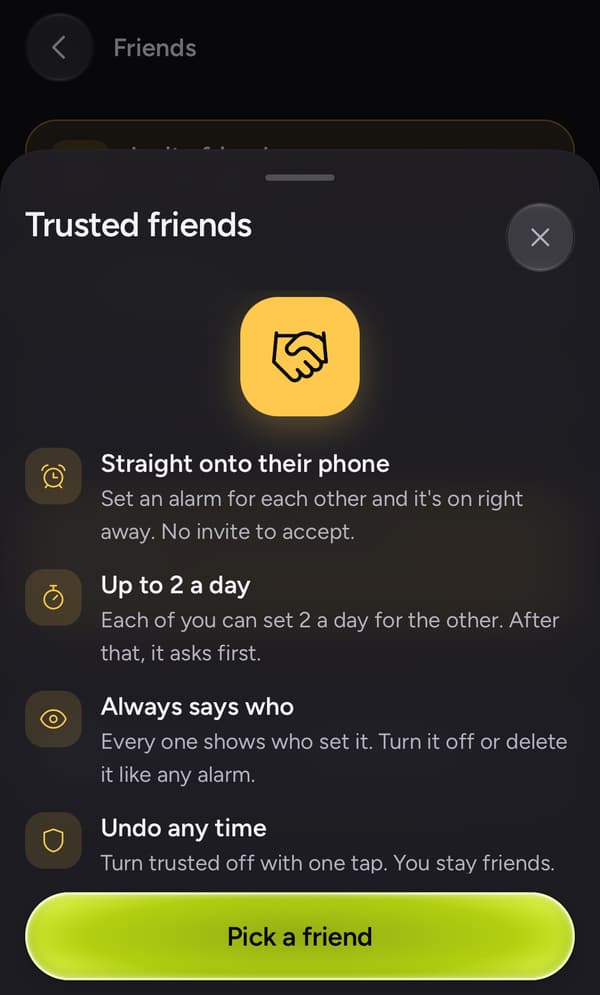
If they're not sure, show them the sheet that comes up first. It says what trusted means in four lines, and that they can undo it with one tap.
For a teen
The goal is a teen who gets where they need to be without you texting "are you up?" four times.
| What | The alarm says | It rings |
|---|---|---|
| The school bus | "Bus in 10. Shoes are by the door" | 7:05am |
| Practice moved | "Practice is at 4 today, leave at 3:40" | 3:40pm |
| The SAT | "Test day. Calculator, ID, snacks" | 6:30am |
| Curfew | "Head home, curfew is 11" | 10:30pm |
| Medication | "Allergy pill before you go out" | 4:00pm |
Let them set alarms on your phone too. It's mutual, and "pick me up at 9 from Maya's" is a lot easier to answer when it rings.
LFG Alarm is for ages 13 and up.
For an older parent
The goal is help that doesn't feel like checking up.
| What | The alarm says | It rings |
|---|---|---|
| The appointment | "Dr. Lee at 10:30, bring the insurance card" | 9:45am |
| The refill | "Call the pharmacy, they close at 5" | 4:00pm |
| The video call | "FaceTime with the grandkids in 10 minutes" | 6:50pm |
| The trip | "Car to the airport at 8, passport is in the drawer" | 7:30am |
On iPhone an LFG alarm rings through Apple's own alarm system, so silent mode and Focus don't swallow it. On Android it takes over the screen like a call. Big words on the screen do more than a buzz they'll miss.
A few house rules that help
- Say what and where. "Dentist, bring the card" beats "Reminder".
- Ring when they need to move, not when the thing starts.
- Use your 2 a day well. That's the limit straight onto their phone, and it keeps it from feeling like nagging. Anything past that still reaches them as an invite.
- Let them turn it off. Any alarm you set is theirs to turn off or delete. And either of you can switch trusted off with one tap.
Ask your AI agent
If you use an AI assistant such as Claude or ChatGPT with the LFG Alarm connector, it can put the alarm on your trusted family member's phone for you.
Have your AI agent make it.
Paste this into ChatGPT, Claude, Grok or any AI agent that can add a connector, not into the LFG Alarm app. The setup steps come with it: get the LFG Alarm app, connect it to your agent once, and your agent makes the alarm in your account.
Use LFG Alarm to set a one-off time alarm for 9:45am on Thursday called "Dr. Lee at 10:30, bring the insurance card", make it a friends alarm, and add my trusted friend [their LFG Alarm username]. It takes them about 30 minutes to get there.
Already have the LFG Alarm app and connected it to your AI agent?
Why it works. It sets the alarm for when they need to leave and puts the one thing to remember on the screen.